

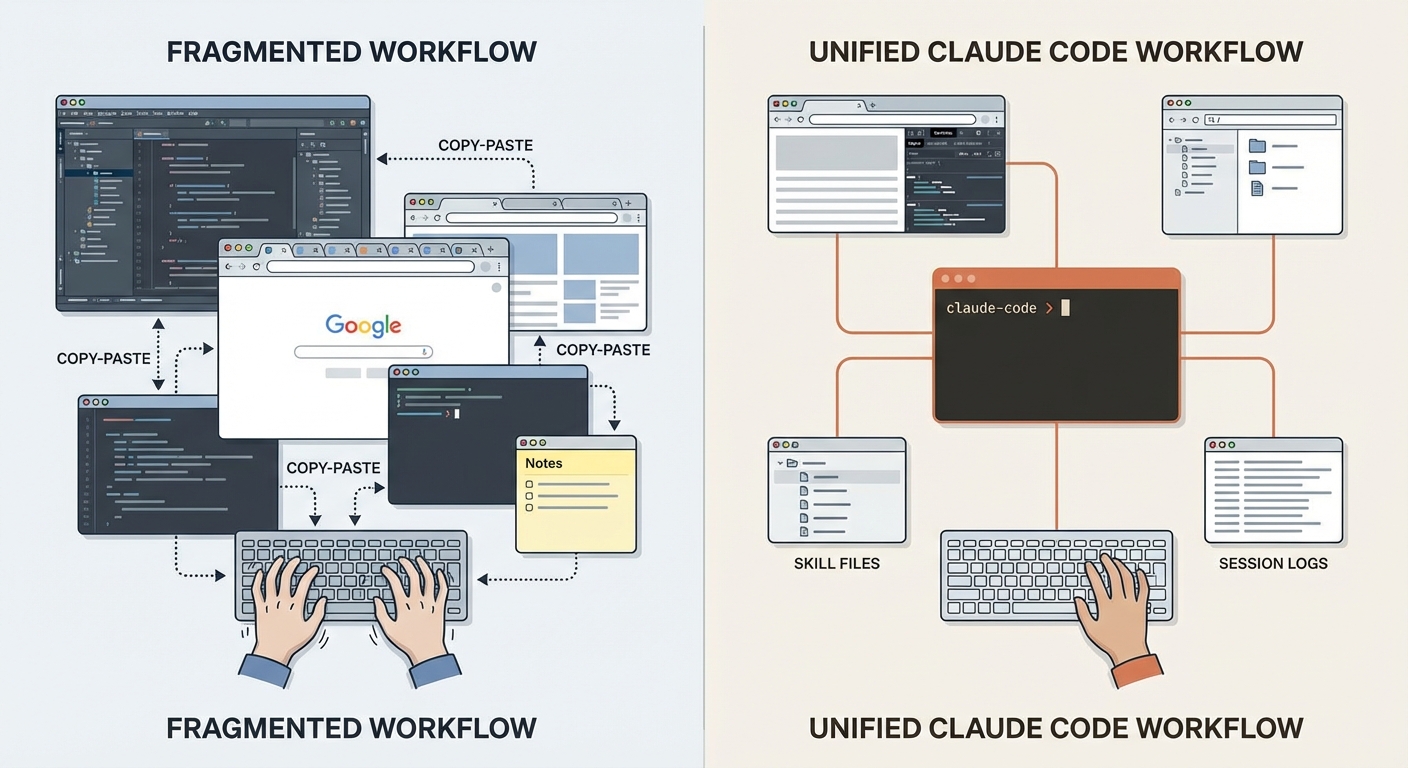
At some point I noticed I'd stopped opening an IDE. No conscious decision — it just happened. And the quick throwaway scripts I used to write myself? Claude Code writes those now. Faster, and usually better — because it has the full context of whatever I was just working on.
What happens when Claude Code stops being a tool and becomes your primary working environment? That's not a rhetorical question. It's a shift that happened over weeks — not through a conscious decision, but through a slow fading out. At some point, I stopped opening the IDE. Not on principle. Because the detour through it no longer added value.
The deeper change shows in a small detail: Claude writes me scripts on-demand at the end of tasks — better than the throwaway scripts I'd have written myself. Not because Claude is smarter, but because it has the full context of the work just completed.
This isn't an article about new features. It's a reflection on four shifts that together create a different way of working: The IDE becomes optional. The browser comes to Claude. Prompts become skills. And Claude uses itself as memory. Four theses about what happens when a tool becomes an environment.
Thesis 1 — The IDE Becomes Optional
For years, the IDE was the center of everything. Writing code, debugging, navigating, refactoring, Git operations — it all happened there. The IDE wasn't just a tool — it was the working environment. The place where software gets built. If you didn't master the IDE, you worked slower. So you learned shortcuts, configured plugins, optimized layouts. You invested hours into keybindings, color schemes, code inspections. The IDE was an extension of your thinking.
Today, my main tool is iTerm with Claude Code. I barely open PyCharm anymore. VS Code not at all. Sublime Text for quick file inspection without context overhead. Fork for Git visualization and merge conflicts. These are exceptions, not the rule.
Here's why: the IDE is click-based. Claude Code is conversation-based. For many workflows — refactoring, code analysis, file operations, project restructuring — the IDE became the detour. "Open file X, navigate to line Y, change Z" versus "Change Z in the function responsible for Y." The second path isn't just shorter — it's richer in context. Claude understands the intent, not just the line.
But the real productivity gain lies elsewhere: multiple parallel instances. Not one Claude Code session, but at least two — often more. Two scenarios:
Parallel tasks in the same project. One instance works on Feature A, another reviews Feature B. Like manually steered sub-agents — each with its own context, its own task. That's something an IDE can't do: true parallelism without context-switching.
Multiple projects simultaneously. Blog article in one terminal, code project in another, documentation in a third. Each instance keeps its state. No tab-switching, no reloading, no "Where was I again?"
The terminal becomes the command center. Not because IDEs are bad — they won't die. For complex merge conflicts, I still reach for Fork, because visual three-way merges aren't replaceable in the terminal. And sometimes I just want to look at a file without starting a Claude session — Sublime Text is enough for that. But these are conscious exceptions. The default has reversed: the IDE used to be the default, the terminal the exception. Now it's the other way around.
Thesis 2 — Claude Gets Direct Browser Access
Everyone who's written frontend code or debugged APIs knows the old pattern: write code, switch to the browser, check the result, manually copy errors, back to Claude, explain context. With every debug cycle, precision was lost — because I had to describe in words what I saw in the browser. "There's a 404 on the API route" is less helpful than the actual network request with headers, timing, and response body. And the more complex the problem, the more got lost in manual translation.
I'd forgotten to mention this in the January article — even though I was already using it daily back then. The new pattern: Chrome DevTools MCP and Firefox DevTools MCP give Claude direct browser access. Console errors, network requests, DOM inspection, screenshots — Claude sees what's happening in the browser. The feedback loop that used to be open is now closed: Claude writes code, the browser renders, Claude sees the result. No more manual intermediation, no more "Hold on, let me check the console."
Concrete use cases — exclusively debugging and analysis: - Read and debug console errors directly, instead of copy-pasting error messages - Inspect network requests: API responses, timing, status codes - DOM inspection for layout issues - Visual regression through screenshots
This isn't a frontend development framework. It's a debugging tool. Claude doesn't write in the browser — Claude reads the browser.
In parallel, ContextMine brings internal documentation to Claude — local codebases, Confluence exports, proprietary APIs. Both tools follow the same principle: tools come to Claude, not the other way around. Instead of me manually gathering context and pasting it into the chat, Claude fetches context itself. That doesn't just reduce work — it improves quality, because Claude sees more context than I'd deliver in words.
★ Insight ──────────────────────────────────────────────────────────────────The shift is subtle but fundamental: from "I describe to Claude what I see" to "Claude sees for itself." That doesn't just change the workflow — it changes the nature of the dialogue. Instead of describing symptoms, I'm discussing causes with Claude, because we're looking at the same data.
────────────────────────────────────────────────────────────────────────────
Thesis 3 — Skills Replace Prompts
The 3x rule: if I prompt something manually three times, it becomes a skill. superpowers:writing-skills is the tool for that — a skill that writes skills. Sounds meta, but it works: I describe the recurring workflow, the skill generates the structure.
The mayflow:update example shows the natural evolution path. It started as a simple command — a few lines that update CLAUDE.md. Then it became a global skill under ~/.claude/skills/, because the logic grew more complex. Today it's a skill in its own plugin, massively expanded: analysis of conversation and codebase, intelligent distribution of insights across files, hierarchy management. This path — command, global skill, plugin skill — wasn't planned. It emerged through iteration.
What's happening here is a conceptual shift: from prompt engineering to skill engineering. A prompt is ephemeral — it exists in a conversation and disappears with it. A skill is persistent, versioned, iterable. And unlike commands, only the description sits in context at startup — commands are loaded completely, skills only with their description. The full skill content loads on-demand when invoked. The first version is rarely perfect. After two or three rounds, it gets better — because practice reveals what's missing.
Skills aren't specs. They don't describe requirements — they describe workflows. But they share a core insight with specs: whoever codifies beforehand what should happen, works better. Instead of formulating every time what Claude should do, the workflow is defined once and called. That's not automation in the classical sense — it's the externalization of work patterns.
For teams, there's an additional dimension: skills in .claude/skills/ are shared knowledge. When one developer codifies a debugging workflow as a skill, the entire team benefits. That's something prompts in Slack messages can't do — because a skill doesn't just describe what to do, it makes it executable.
★ Insight ──────────────────────────────────────────────────────────────────The shift from prompt engineering to skill engineering changes what "expertise" means. It's no longer about formulating the perfect prompt. It's about recognizing recurring patterns and codifying them so they become repeatable, shareable, and improvable. That's a different competency — closer to software design than to prompt crafting.
────────────────────────────────────────────────────────────────────────────
Thesis 4 — Claude Uses Itself as Memory
Cross-session memory is one of the biggest open problems in LLM-based workflows. Every new session starts from zero. No context from yesterday, no memory of last week's decisions. If you've ever spent three days on a complex feature and then had to rebuild the entire context from scratch in a new session, you know the frustration.
Here's what I discovered: Claude Code stores every session as a JSONL file under ~/.claude/projects/. That's not an advertised feature — it's a byproduct of session management. But it's usable. Each conversation is stored as a sequence of JSON objects, one per message. The JSONL format is key here: each line is a standalone JSON object. Claude can read files partially — the first 100 lines of a 10,000-line session are often enough to understand the context. These files can be handed directly to Claude: "Read this session and find last week's architecture decision."
Use cases: - Reconstruct past decisions: "What did we decide on the database schema?" - Trace architecture choices: "Which pattern did we pick for the API layer and why?" - Bridge context between sessions instead of explaining everything from scratch
What makes this elegant: no setup, no configuration, no additional tool. The logs already exist — you just have to use them. Claude reads its own traces. The system becomes self-referential without being designed that way.
The honest limits: Session mining requires manual instruction — Claude doesn't search logs automatically. I have to actively say: "Read last week's session." The JSONL files can get large — a multi-hour session quickly generates thousands of lines. And with hundreds of sessions on large projects, navigation becomes difficult. It doesn't replace a real Memory MCP that automatically indexes and retrieves relevant information. It's a pragmatic workaround, not a full-fledged memory system. But for most of my projects — where I still know and can name the relevant sessions — it's enough.
★ Insight ──────────────────────────────────────────────────────────────────What's interesting here is the self-referential nature: a system that uses its own output logs as input. No external database, no configured memory — just the naturally occurring artifacts of its own work. That's the simplest form of memory: reading yourself.
────────────────────────────────────────────────────────────────────────────
The Common Thread: Think First, Then Act
Four theses, one pattern: structure before action.
Not all four theses are equally close to this principle. Theses 1 and 4 connect directly to the idea that thinking must come before doing:
Thesis 1 — IDE-free work forces clearer thinking. Without a graphical interface that invites clicking, I have to articulate what I want. That's slower than a double-click — but it forces me to know my goal before I act. Spec-Driven Development formalizes exactly this principle: specify first, then implement.
Thesis 4 — Session mining reveals what was truly valuable in past sessions. And it's almost never code fragments. It's decisions: Why this pattern? Why this library? Why this architecture? What you search for in old sessions is almost always the reasoning — not the implementation.
Thesis 2 — Browser access follows a different principle. It's not about structure before action, but about context convergence: tools come to Claude instead of me manually transporting context. Valuable, but a different kind of shift.
Thesis 3 — Skills aren't specs. Skills describe workflows, specs describe requirements. But both emerge from the same insight: whoever thinks beforehand works better. Codification before execution — whether as skill or as spec — reduces errors and increases consistency.
SDD as a mindset, not a methodology. Not in the sense of "install this framework and follow these steps." But in the sense of a fundamental question: "Have I defined what should happen before it happens?" This question runs through all four theses — sometimes directly, sometimes as a distant echo. It's not a framework you install. It's a way of thinking that creeps in when you work long enough with a system that rewards clarity and punishes ambiguity.
Conclusion
This isn't a setup anymore. It's a way of working.
Terminal instead of IDE. Browser access instead of copy-paste. Skills instead of prompts. Session logs instead of forgetting. Four shifts that together create something larger than the sum of individual tools. Not because the tools are spectacular — but because they reinforce a pattern: structure before action, thinking before doing, codifying before executing. The common thread isn't technical. It's methodical: whoever doesn't just use their tools but shapes them, works differently.
This is my path. Not a universal recommendation, not a "This is how you must work." What I've described emerged from my practice — iteratively, not planned. Someone with a different stack, different projects, a different work style will find different patterns. Working differently isn't working wrong. But if you start observing your own patterns and formalizing them, you'll probably arrive at similar places: the realization that structure before action isn't overhead — it's the prerequisite for tools to unfold their full potential.
The exploration continues. The tools mature, the practices deepen, and from what works today, new patterns will emerge. Which ones — practice will show.
This article was originally published on Medium.