

A workflow orchestrates concurrent subagents in the background — the new layer of coordination sits inside a single task.
In March, this series was about tools: which plugins, which MCPs, which skills end up in my stack. Three months later the real question has shifted — it's no longer "which tools" but: who's directing the work, and at which level? How I work hasn't changed in the process: multiple windows and tabs, multiple tasks per project, multiple projects in parallel, juggled by hand — just like in March. What's new is a layer underneath: inside a single task, the tool now orchestrates subagents itself. A single workflow can drive up to 16 concurrent and 1,000 agents total in the background — written as a script instead of by hand. If you still doubt by the end that this shifts something — the answer is in the conclusion.
As always, this article is a fresh snapshot: what I actually use today, why, and how it all connects. No tutorial, no comprehensive feature guide — a curated inventory from my daily practice. The stack has stayed remarkably stable — and so has the way I work; what shifted is what runs inside a single task.
Quick Setup: What's Shifted Since March
The core from the March edition holds: language server, Superpowers, Context7, browser DevTools MCPs. What's changed isn't the catalog — it's the layer above it. Just the delta here, not the full stack.
Absolutely essential:
| Tool | Type | What changed |
|---|---|---|
| Opus 4.8 | Model | New high-effort default; /effort sets the level — I run high, xhigh situationally for the hardest tasks |
| Superpowers | Plugin | Still the skill backbone — unchanged, still essential |
| pr-review-toolkit | Plugin | Unchanged: daily multi-agent PR review before every merge |
Daily drivers:
| Tool | Type | What changed |
|---|---|---|
mayflow | Plugin/Marketplace | My own marketplace, the most visible change in the plugin setup |
| Context7 | Plugin | Now available as a marketplace plugin (context7@claude-plugins-official) |
On demand:
| Tool | Type | What changed |
|---|---|---|
| Fast Mode | Model mode | 2.5× speed at 2× cost on Opus 4.8 — situational for quick iterations, not for constant use |
fallbackModel | Setting | Up to 3 fallback models; --fallback-model now works interactively too (previously -p only) |
/safe-mode | Command | Disables CLAUDE.md, plugins, skills, hooks, MCP for troubleshooting |
# My default for high effort; --effort xhigh I pull only situationally
claude --effort high

# Fallback chain (up to 3), now works interactively too
claude --fallback-model claude-opus-4-7
These features landed in the stack with version 2.1.154 — rolled out on 28 May 2026, alongside Opus 4.8. On top of that, two detail knobs I use: I run with alwaysThinkingEnabled: true, but the counterpart now exists in fine-grained form — MAX_THINKING_TOKENS=0 or --thinking disabled turns thinking off per model, and the thinking summaries are grouped and capped (v2.1.166/183). And the "Lean System Prompt" has been the new default for all models except the older ones since v2.1.154 — less boilerplate context at every start.
The actual delta deliberately isn't in these tables: it isn't a single tool, it's who coordinates the tools. More on exactly that next.
Orchestration: A New Layer Inside the Task
This is the core of this edition — but not in the way it first sounds. In March I described how I run several Claude Code windows in parallel: started by hand, assigned by hand, kept in view by hand. I keep doing exactly that — one task per window, multiple tasks and projects side by side. What's been added sits underneath: inside a single task, the tool now takes over coordinating the subagents.
Dynamic Workflows are the central new thing. Instead of working a task through one chat, Claude writes a small JavaScript program per task that drives subagents concurrently in the background — up to 16 concurrent and 1,000 agents total per run. I watch progress live via /workflows. The feature is GA and runs in the CLI, the desktop client, and the VS Code extension. A workflow is triggered through the keyword ultracode (highlighted in violet); the old trigger workflow no longer works. Honestly, I've only started using this seriously myself recently.
The distinction matters, because two kinds of parallelism get conflated here. One is my old one: multiple windows, each on its own task — that stays, a workflow changes nothing about it. The other is new and sits inside a single task: fan-out, pipeline, verify, which previously either ran linearly in one chat or not at all. I describe the goal, and the workflow fans the work out itself, collects the results, and checks them — deterministically, as a script. A workflow always handles just one task; the tasks side by side are still mine to juggle.
The difference from parallelizing by hand isn't gradual but qualitative: when I wanted to break a task into parallel strands before, it hinged on my attention — if I forget a strand, it gets left behind. The workflow, by contrast, fans out the same way every time, in the same order, deterministic instead of dependent on my short-term memory. So the gain is reproducibility, not just speed.
This determinism shift feeds into a second delta: autonomy. Auto Mode no longer needs separate approval (v2.1.152), and the safety classifier detects data exfiltration and dangerous paths more reliably. Combined with workflows, that means an orchestrated run can work longer stretches in one go without me approving each stage individually — the guardrails live in the tool, not in my presence. That's the practical lever that makes orchestration worthwhile in the first place: a workflow that waits for a confirmation at every subagent would be slower than the manual work it's meant to replace.
On top of that come recursive subagents: a subagent can itself spawn subagents, up to five levels deep (v2.1.172). That's powerful, but not without edges. The honest caveat belongs here: GitHub issue #68619 reports recursion and token problems with nested subagents — open as of this writing. My build already caps nesting at five levels — in the foreground too, since v2.1.181 — but a further fix for it (v2.1.187) is announced and not yet installed. Anyone using recursive subagents in depth should keep that in mind.
The third mechanic in the cluster: implicit agent teams. The explicit tools TeamCreate/TeamDelete are gone (v2.1.178); instead, every session has an implicit team, and teammates are spawned directly via the name parameter of the Agent tool. The experimental Agent Teams feature itself — actual peer instances — comes further down in "Where Things Stand"; here it's only about the implicit mechanic that simplifies spawning.
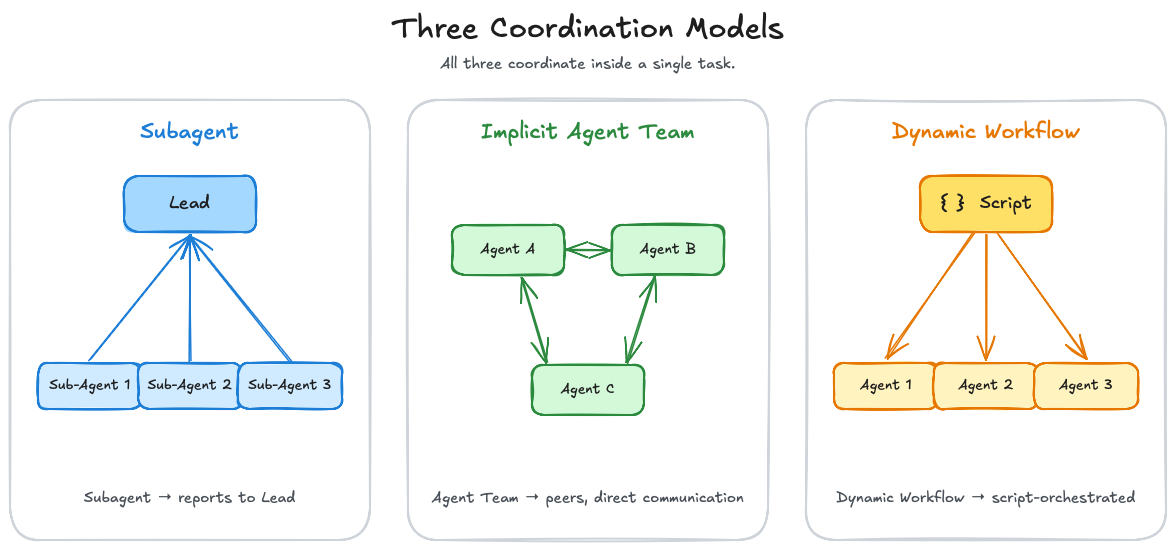 Three coordination models compared — the subagent reports back to the lead, agent teams work as peers, and a Dynamic Workflow orchestrates both via script.
★ Insight ──────────────────────────────────────────────────────────────────The real shift since March isn't "more tools," it's a second layer of coordination. Above the tasks I still carry the load myself: start windows, keep projects in view, assign tasks — same as always. What's new is the layer underneath: inside a single task, the tool coordinates — it fans out, collects, and checks. Not "the human no longer coordinates," but "coordination now happens on two levels, and the lower one is newly automated."
────────────────────────────────────────────────────────────────────────────
Plugins: The Official First-Party Directory
Plugins existed in March too — but they came through community marketplaces I had to add by hand (/plugin marketplace add obra/superpowers-marketplace and the like). Today I source them through the official, Anthropic-curated first-party directory anthropics/claude-plugins-official: available automatically at start, no more manual adding. Discover via /plugin > Discover, install via /plugin install <name>@claude-plugins-official. The repository itself is split into two folders: plugins/ (curated internally by Anthropic) and external_plugins/ (community and partners, quality- and security-gated with its own submission form).
Two workflow conveniences are tangible here: plugins that live in .claude/skills now load automatically — the detour via the marketplace is gone. And building your own plugin has become a one-liner: claude plugin init <name> scaffolds the structure, /plugin list --enabled/--disabled shows the state.
# Install a plugin from the official marketplace
claude /plugin install code-review@claude-plugins-official

# Scaffold your own plugin
claude plugin init my-plugin
The Anthropic-curated set is small and useful precisely because of that: code-review, skill-creator, hookify, plugin-dev, mcp-server-dev, feature-dev — plus the baseline of commit-commands and pr-review-toolkit. Especially handy: /code-review --fix applies review findings directly to the working tree — the apply step between "review finds something" and "fix lands in the code." It's available to me; the --fix flag itself I haven't run in anger yet. The per-language LSP plugins (pyright-lsp, typescript-lsp, rust-analyzer-lsp and more) are formalized here too: the baseline's language-server theme is now curated in the marketplace instead of being wired up by hand.
Two detail improvements make working in larger setups noticeably easier. First: nested .claude/ directories (v2.1.178). On name collisions the definition closest to the working directory now wins — for agents, workflows, and output styles. Skills behave differently on purpose: on a name clash both are kept, the nested one appears as <dir>:<name> (for me, e.g. mayflow:update), so nothing is lost. For monorepos and multi-workspace work that means each sub-workspace can carry its own configuration without me touching anything globally. Second: skill hot reload. It existed already; v2.1.174 fixed it so that a single skill change re-announces only that one skill instead of the whole list (which saves tokens), and /reload-skills (v2.1.152) re-scans the skill directories without a session restart. That directly reinforces the "iteration over perfection" practice from March: I write a skill, test it, adjust it — without throwing the session away each time.
What really makes the marketplace useful for me isn't the sheer selection, it's that it makes the context cost visible. The browse pane shows a plugin's projected context cost before I install it, lists the included components up front, and enforces dependencies — and there's a search bar. That fits the series discipline exactly: every plugin costs tokens at startup, and my question stays unchanged — "does this solve a real problem?" A marketplace that displays the cost right alongside answers half the question for me. (Whether this tooling maturity falls exactly into the March window is fuzzy — it's more a maturing over this stretch than a hard "new since March.")
In the MCP setup, meanwhile, Claude in Chrome has evolved further: multi-browser selection and bundled tool loading complement the baseline's browser DevTools MCPs. So the browser refresh carries this edition's MCP update. Alongside it, ContextMine stays my tool for internal documentation — used per project when a project has its own docs that Context7 doesn't cover (public vs. internal, cleanly separated). A practical aside, in case anyone manages MCPs per project: disabling runs per project — disabledMcpServers doesn't apply globally, the disable switch sits under /plugin, and the CLI knows no disable, only remove.
Memory: From Session Mining to an Auto-Loaded System
In March I described session mining: Claude reads its own JSONL logs when I explicitly tell it to. That was pragmatic but manual. Since then it's become a structured, automatically loaded memory system — and that's the real transformation of this section.
The core: a SessionStart hook injects a global memory index at start. I no longer have to load anything by hand; the relevant context is there before I type the first word.
The pattern behind it is file-based and needs maintenance discipline, otherwise the advantage flips into its opposite. Three building blocks shape my setup:
- Tiered sub-indexes: large, topic-bound clusters move into lazily loaded
MEMORY-<SLUG>.mdfiles that do not come into every session automatically. The main index keeps just one stub line per cluster with trigger keywords. That keeps the auto-loaded hot path lean — because every line in the index costs context at every session start. - Frontmatter schema: every memory file carries metadata (name, description, type), so routing and maintenance work.
- Cross-links: memories reference each other, so related notes can find one another.
The conceptually most important part, though, is a rule, not a mechanism: validate memory against reality. Memory is a snapshot from the moment of writing, not a live feed. Versions, paths, flags, tool availability change. Before I base a hard-to-reverse or outward-facing action on a remembered fact, I check it against ground truth — filesystem, git status, a running version. Memory is the starting point, not the last word.
★ Insight ──────────────────────────────────────────────────────────────────Auto-loaded memory is a double-edged sword: it hands you context but demands maintenance discipline in return. The real craft isn't in collecting but in keeping the index lean — because whatever auto-loads costs tokens at every session start. A memory system that keeps everything suffocates on its own hot path.
────────────────────────────────────────────────────────────────────────────
Best Practices: Hooks as a Policy Engine, Specs as ADRs
What was still loosely "best practices" in March has condensed into something more concrete: for me, hooks are no longer a convenience but a policy engine. They encode business rules the tool enforces — instead of me having to remember them.
- Hooks as the enforcement backbone (pattern level): four hook events carry the setup. SessionStart injects the memory index. PostToolUse acts as a guard and arms automations. Stop reminds me of open commits/pushes. PreToolUse guards against risky worktree operations. The changelog widened the room directly: a
MessageDisplayhook can transform or hide assistant output (v2.1.152),SessionStartcan setreloadSkillsandsessionTitle(v2.1.152), and Stop/SubagentStop hooks can returnadditionalContext(v2.1.163) — all in my build. - Granular permission syntax: permission rules now match tool parameters, not just tool names —
Tool(param:value). That lets you block, say,Agent(model:opus)specifically to rule out expensive Opus subagents;*wildcards work. (v2.1.178) That fits a permission-driven setup exactly. - Destructive Git commands blocked in Auto Mode:
git reset --hard,git checkout -- .,git clean -fd,git stash dropare blocked in Auto Mode unless I explicitly request them as a discard (v2.1.183). On a worktree- and force-push-heavy Git workflow that's real data-loss protection. /safe-modefor troubleshooting:--safe-modedisables CLAUDE.md, plugins, skills, hooks, and MCP in one go (v2.1.169). On a hook- and skill-heavy setup exactly that is gold when something jams and I want to isolate the cause.
The second strand is the spec→ADR hardening — the direct continuation of "SDD as a daily workflow" from March, now with artifact hygiene. Raw specs from brainstorming are deliberately discarded after implementation — or, only on an architecture-worthy decision, distilled into a MADR-4.0 ADR. A PostToolUse hook catches specs that land in the wrong place. Out of exactly this practice a concrete artifact also emerged: a shareable excalidraw-generation skill (generates .excalidraw diagrams programmatically and documents the PNG export path) — a textbook case of the 3× rule, now with the extra step from repeated need to an exportable skill. One teaser on the side: I'm currently working on something with the working name SAGE — more on that later.
Two small IDE notes on the side: /terminal-setup fixes the GPU-induced garbled text in VS Code, Cursor, and Windsurf (v2.1.157/160). And two new commands have settled in: /cd switches the session directory without breaking the cache (v2.1.169), /config key=value sets inline settings (v2.1.181).
Where Things Stand: What I'm Watching but Not Yet Using
Not everything that happened in the window already runs productively for me. Three things I'm watching — honestly as a sneak peek, not hands-on.
Agent Teams are the experimental full form of orchestration. Behind the env flag CLAUDE_CODE_EXPERIMENTAL_AGENT_TEAMS=1 sit actual peer instances of Claude Code, each with its own context window, that communicate directly with each other — unlike subagents, which only report back to the lead. Coordination runs through a shared task list with dependency tracking, file locking, and mailbox messaging. That's the real multi-instance variant, formalizing the baseline pattern. But: off by default, experimental, stability and adoption unproven — so I watch it rather than recommend it. The more recent mechanic (native iTerm2 panes, v2.1.186) is announced but isn't in my build.
Fable 5 had maybe the shortest life I've ever seen for a model. Anthropic made the "Mythos-class" model — positioned above the Opus class — generally available on 9 June 2026 and shut it down again three days later, after the US government issued an export-control directive on grounds of national security. To this day access hasn't returned; the government hasn't officially laid out the exact reasons. So there's nothing to test — but as a precedent for how fast a frontier model can disappear again, it stays on my radar.
And finally an honest research limit. What Anthropic officially ships and recommends is well documented and partly tested myself. What "the community uses most" is far softer than the circulating numbers suggest: aggregate metrics — star leaderboards, install counts, directory sizes — didn't survive adversarial verification, and named expert recommendations beyond Anthropic couldn't be confirmed twice independently. The landscape does hold community marketplaces like wshobson/agents; I name them as landscape, not as a recommendation. My curated style stays: whatever doesn't provably solve a real problem doesn't enter the stack.
Conclusion: Who's Directing — and at Which Level?
Back to the opening question: who's directing the work — and at which level? The stack has stayed remarkably stable, and so has the way I work: I still juggle multiple windows, tasks, and projects by hand. The shift isn't above that but underneath — one level deeper, inside the single task. There I no longer direct every step; the tool orchestrates its subagents itself. So the honest answer is two-tiered: above the tasks I still direct — inside a task, increasingly the tool now does.
As always: not a finished process, a snapshot that'll keep evolving. Orchestration is still young — the bug caveat around nested subagents and the experimental parts stay on my radar. But the direction is clear. It's no longer just about which tools — it's about who directs which level of the work.
This article was originally published on Medium.